Posts

SharePoint Apps authorizations

Last few days I was experimenting with SharePoint App model. Provider hosted apps which is a type of app which provide by SharePoint. In this category of apps, app will have a separate web component running out side the SharePoint box which App is installed. When the out side hosted component needs access to the SharePoint list and libraries of the SharePoint farm which app is installed there is a requirement to authorize access from those hosted web components. According to the MSDN there are three different authorizations defined for SharePoint apps which can be used in this scenarios. Low Trust – Provider hosted apps for SharePoint use Azure ACS (Access Control System) to get the token which they can use to access SharePoint resources (List libraries and other resources) which app installed SharePoint farm. This use OAuth 2.0 framework and Azure ACS is the token issuer. If app is using this mechanism it can be sold in SharePoint App Store. Low trust system is there mostly for...
SharePoint Configuration Mysteries

Image
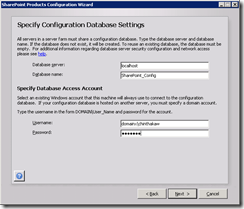
Recently I faced problem when configuring SharePoint on my development machine which consumed several hour of my valuable time. Its so strange and I reinstalled SharePoint 3 times to notice the mistake which I have done. Problem was just after installing SharePoint 2013 and then when I started the configuration wizard, its just automatically ran till end which out allowing me to enter Database server which It needs to be installed. Window which didn’t appear Just after searching through the internet found that this was all due to option which I selected when installing SharePoint. When installing SharePoint at one point its giving user to select Complete or Stand-alone. In the stand-alone description its mention that this is the option which you need to select if you are using SharePoint as a developer. But as a developer when I need to have more flexibility on configuring my environment. So it is necessary to configure it on my choice of configuration. I wanted to change my op...

Delay Loading of Data in SharePoint 2010

Image
Today I found really good article about delay loading web part data in SharePoint 2010 site. I has all the coding and demonstration of how it works after implementing it. Hope this will help us some day when doing complex web part implementations. http://kjellsj.blogspot.com/2011/06/delayed-load-sharepoint-2010-web-parts.html Cheers

SharePoint Dispose Checker Tool

Image
Running SPDisposeCheck tool against SharePoint code is good practice to avoid unnecessary performance and other runtime issues. Following information will help you to to install and configure SPDisposeCheck tool in your development environment. Download SPDisposeCheck Tool SPDisposeCheck tool can be downloaded from here More information regarding SPDisposeCheck tool can get from URL http://archive.msdn.microsoft.com/SPDisposeCheck Configuring SPDisposeCheck Tool 1. Download and install SPDisposeCheck setup.     2. Go to Visual Studio 2010 Tools menu External Tools 3. Click Add and add SPDisposeCheck.exe as command. Give Arguments and Initial Directory values as given in the following window. Tick Use Output window to show error in the output window. Click Ok. 4. Go to Visual Studio Tools menu and click SPDisposeCheck. 5. Check output window for issues identified by SPDisposeCheck issue. 6. Now only thing remain is fixing issues listed in the output wind...

Creating SharePoint 2010 Development Environment

Today I gave a hand to my team member to create his SharePoint 2010 development environment. When I was running configuration wizard it suddenly ran the way I never expected without giving any details on database access and any other information (Usually it prompt us to enter account details and database server details). So I wanted to write this post to help others on how to prepare development environment. When I searched through the net I found this MSDN article which shows the full guide one how to prepare the SharePoint 2010 development environment. http://msdn.microsoft.com/en-us/library/ee554869.aspx

Installing Microsoft SharePoint Server 2013

Image
Yesterday we downloaded the newest preview version of Microsoft SharePoint 2013. Preview version is available in technet http://technet.microsoft.com/en-us/evalcenter/hh973397 . I configured a virtual machine with the preview version and following are the steps I followed to configure the SharePoint 2013. Prerequisites Installed OS – Microsoft Windows server 2008 R2 SP1 Installed Microsoft SQL Server 2008 R2 SP1 Find more information about the prerequisites from the link http://technet.microsoft.com/en-us/library/cc262485(office.15).aspx Downloaded SharePoint 2013 installer using link http://technet.microsoft.com/en-us/evalcenter/hh973397 Above link will download .img file named SharePointServer_en-us.img. I installed winrar and extracted the content inside the .img file to a separate folder. Installation steps Then I ran the installer and it gave following message. Which said I need to have couple of updates need to install in to the system. Microsoft has provided a tool...

BizTalk 2009 BAM Portal Configuration Issue

Image
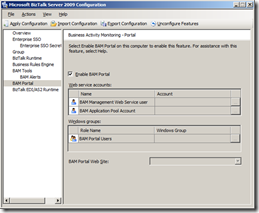
In my BizTalk development environment I configured BAM portal some times back and I configured BizTalk several times after that. Today when I tried to access the BAM portal url it wasn’t there. So I checked the BizTalk configuration wizard and it look like follows. I thought that I haven’t configured the BAM portal so I pressed the Apply configuration and applying process went smoothly. But still the portal did configured. Then I found that this was due to a previous configuration I have done to the environment. I followed following steps to correct the issue. Open the command prompt in administrator mode. Go to the location where the bm.exe resides. It usually resides in “ C:\Program Files (x86)\Microsoft BizTalk Server 2009\Tracking” folder. Then run the following command to get the current BAM portal configuration values to a configuration file. bm get-config -FileName:"BAM_Config.xml" This will create a BAM_Config.xml file under the same location where the bm.ex...