Posts

SharePoint App Only Registration Key Renewal script

################################## ## Checking secret working ################################## $clientSecret = 'xxxxx' Connect-PnPOnline -Url "https://xxxx.sharepoint.com/sites/DevSite" -ClientId 67c86709-5348-45b9-a16b-9b7a983a20c2 -ClientSecret $clientSecret Get-PnPConnection Get-PnPListItem -List LookupList ################################### ## Get all Keys #################################### $msolcred = get-credential connect-msolservice -credential $msolcred $clientId = "67c86709-5348-45b9-a16b-9b7a983a20c2" $keys = Get-MsolServicePrincipalCredential -AppPrincipalId $clientId $keys ################################## ## Remove keys ################################## Remove-MsolServicePrincipalCredential -KeyIds $keys.KeyId -AppPrincipalId $clientId ######################################## ## Generate key for 3 years ######################################## $bytes = New-Object Byte[] 32 $rand = [System.Security.Cryptography.RandomNumberGenerator]::Cre...

Microsoft Forms File Upload & limitations

Image
File upload controller File upload controller can be added to the form just licking the type of the file. Once form is submitted file is uploaded in to the OneDrive as follows. File can be access using Power Automate and can be saved in to a SharePoint list. Limitations Forms file upload is available only who login. If you want to have anonymous access to the form this can not be achieved. Power App Portal is another approach to if you are dealing with anonymous users who want to upload files.   https://powerapps.microsoft.com/en-us/portals/

Microsoft Flow SharePoint isFolder condition check

Image
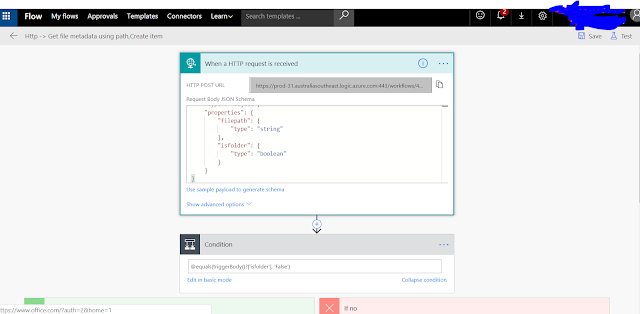
When you want to check a condition for value coming from json boolean type use the following technique. I spend quite few minute  for couple of time to get a proper way. Thought of recording for future use.

SharePoint Online remove App menu item missing

Image
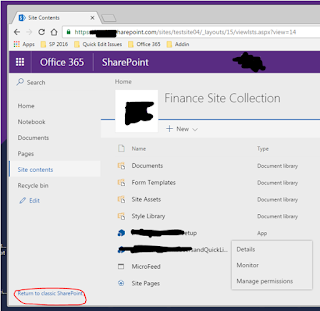
I deployed some test apps to check some functionality and suddenly noticed that remove app menu item is missing. Wasting about an hour figure out that we need to click on the return to classic SharePoint to go back to older view and use that menu to remove the app. Missing Remove menu item. Old look and feel with remove menu item Just after doing that faced another issue where I couldn't go back to the new look and feel mode. I had global admin privileges when I was doing this so I initially though i change entire tenant back to classic mode. Killing another few minutes figure out its just a temporary and once you close all the browser windows and login again it will give you the modern look and feel. Hope this will save time on someone else.

SharePoint 2013 Quick edit for large lists

Image
In SharePoint 2013 if list has large no of items sometimes its not showing quick edit option for the list. When this happens there is another way we can edit all the rows by using DataSheet View. https://spdatasheet.codeplex.com/

How to get SharePoint dll version using JavaScript quickly

If you are working on SharePoint apps development you will need to know the SharePoint dll version to put webparts in to the page. In webparts we need to provide the SharePoint dll version in the  '  In this sinario you can use following service url and make a quick call and get the version of the SharePoint dll on Office 365 SharePoint Online as well as SharePoint Onprem. /_vti_pvt/buildversion.cnf SharePoint On Premise output vti_encoding:SR|utf8-nl vti_buildversion:SR|15.0.4737.1000 SharePoint Online Office 365 output as of 04/07/2017 vti_encoding:SR|utf8-nl vti_buildversion:SR|16.0.6621.1204 Function for get the version no.     getSharePointVersion: function () {         var ver = null;         $.ajax({             url: "/_vti_pvt/buildversion.cnf",             async: false,         }).done(function (result) {    ...

Create SharePoint online site collection using console application

This summary is not available. Please click here to view the post.

SharePoint 2013 Themes

Here is good article about SharePoint Themes. This explains lot of information about themes and how we can modify them. It also has steps of how we can use SharePoint Color Palette Tool. https://en.share-gate.com/blog/create-sharepoint2013-theme-using-color-palette-tool SharePoint Color Palette Tool Download Link https://www.microsoft.com/en-au/download/details.aspx?id=38182

How to select ApplicationPoolIdentity user from windows select user window

Image
1. In the select Users or Groups window Select local server name 2. Type IIS AppPool\DefaultAppPool as object name to select 3. Press check Names. Default App pool account will resolve

Project Server access using OData service

// Get Project data function GetProjectData(filterValues) {     var d = $.Deferred();     var url = "https://epmo.dtz.com/Defence/_api/ProjectData/Projects?$select=ProjectName,ProjectIDCopy,ProjectDescriptor,DeliveryAgentProjectManager,ProjectDeliveryRegion,ProjectManagerName,TotalMultiYearbudget";     var filter = "";     // Creating the filter     for (var property in filterValues) {         if (filter && filterValues[property]) {             filter += " and ";         }         if (filterValues[property]) {             filter += "substring(" + property + ",0," + (Number(filterValues[property].length) - Number(1)) + ") eq" + "'" + filterValues[property] + "'";  // Building filter eg:substring(ProjectName, 1, 2) eq 'CA'         }     };     // If fil...

Reading Excel file Rows and Cells C# code

Simple POC did to read Excel file rows and columns. Code extracted from following link. https://www.codeproject.com/Tips/801032/Csharp-How-To-Read-xlsx-Excel-File-With-Lines-of       public static void ReadExcel()         {             var count = 0;             foreach (var worksheet in Workbook.Worksheets("2010AllItems.xlsx"))                 foreach (var row in worksheet.Rows)                 {                     count++;                     foreach (var cell in row.Cells)                     {                         Console.WriteLine(cell.Text);             ...

SharePoint 2013 bulk Item Update C# code

For more information check this link.         http://sharepointkitchen.blogspot.com.au/2014/12/bulk-insertupdatedelete-items-from.html public static void BulkUpdate()         {             var siteUrl = "http://zdc1ws048:4321/test/Sharepoint2010";             var listName = "TestList";             var columnName = "Title";             var searchValue = "TestValue07";             var newValue = "It is Updated";             try             {                 using (SPSite _oSite = new SPSite(siteUrl))                 {                     using (SPWeb _oWeb = _oSite.OpenWeb()) ...

SharePoint List Creation JSOM example

//

Missing “Apps you can add” with custom master page in SharePoint 2013

Image
After you put a custom master page on SharePoint 2013 in Add app page you don't see "Apps you can add" section? Is this is the case you have change the visibility of some sections on the custom master page. Just change visibility of following content holders to true you will see the section again.  runat="server"/>  runat="server" /> Hope this will help you in someway.

Adding Quick Launch to Page Layout

When we need to add Quick Launch to the page layout we can use following code.     ID="SiteMapDS"     runat="server"     EnableViewState="false"     SiteMapProvider="CurrentNavigation"     StartFromCurrentNode="true"     StartingNodeOffset="0"     ShowStartingNode="false"     TrimNonCurrentTypes="Heading"/>         ID="CurrentNav"     EncodeTitle="false"     runat="server"     EnableViewState="false"     DataSourceID="SiteMapDS"     UseSeparateCSS="false"     UseSimpleRendering="true"     Orientation="Vertical"     StaticDisplayLevels="2"     MaximumDynamicDisplayLevels="0"     CssClass="s4-ql"     SkipLinkText="<%$Resources:cms,masterpages_skiplinktext%>"/> Following links will help you to get some samples how to do this. http://heatherwaterman.com/2014/07/lef...

SharePoint Apps authorizations

Last few days I was experimenting with SharePoint App model. Provider hosted apps which is a type of app which provide by SharePoint. In this category of apps, app will have a separate web component running out side the SharePoint box which App is installed. When the out side hosted component needs access to the SharePoint list and libraries of the SharePoint farm which app is installed there is a requirement to authorize access from those hosted web components. According to the MSDN there are three different authorizations defined for SharePoint apps which can be used in this scenarios. Low Trust – Provider hosted apps for SharePoint use Azure ACS (Access Control System) to get the token which they can use to access SharePoint resources (List libraries and other resources) which app installed SharePoint farm. This use OAuth 2.0 framework and Azure ACS is the token issuer. If app is using this mechanism it can be sold in SharePoint App Store. Low trust system is there mostly for...

SharePoint Configuration Mysteries

Image
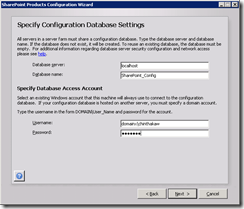
Recently I faced problem when configuring SharePoint on my development machine which consumed several hour of my valuable time. Its so strange and I reinstalled SharePoint 3 times to notice the mistake which I have done. Problem was just after installing SharePoint 2013 and then when I started the configuration wizard, its just automatically ran till end which out allowing me to enter Database server which It needs to be installed. Window which didn’t appear Just after searching through the internet found that this was all due to option which I selected when installing SharePoint. When installing SharePoint at one point its giving user to select Complete or Stand-alone. In the stand-alone description its mention that this is the option which you need to select if you are using SharePoint as a developer. But as a developer when I need to have more flexibility on configuring my environment. So it is necessary to configure it on my choice of configuration. I wanted to change my op...

Delay Loading of Data in SharePoint 2010

Image
Today I found really good article about delay loading web part data in SharePoint 2010 site. I has all the coding and demonstration of how it works after implementing it. Hope this will help us some day when doing complex web part implementations. http://kjellsj.blogspot.com/2011/06/delayed-load-sharepoint-2010-web-parts.html Cheers

SharePoint Dispose Checker Tool

Image
Running SPDisposeCheck tool against SharePoint code is good practice to avoid unnecessary performance and other runtime issues. Following information will help you to to install and configure SPDisposeCheck tool in your development environment. Download SPDisposeCheck Tool SPDisposeCheck tool can be downloaded from here More information regarding SPDisposeCheck tool can get from URL http://archive.msdn.microsoft.com/SPDisposeCheck Configuring SPDisposeCheck Tool 1. Download and install SPDisposeCheck setup.     2. Go to Visual Studio 2010 Tools menu External Tools 3. Click Add and add SPDisposeCheck.exe as command. Give Arguments and Initial Directory values as given in the following window. Tick Use Output window to show error in the output window. Click Ok. 4. Go to Visual Studio Tools menu and click SPDisposeCheck. 5. Check output window for issues identified by SPDisposeCheck issue. 6. Now only thing remain is fixing issues listed in the output wind...

Creating SharePoint 2010 Development Environment

Today I gave a hand to my team member to create his SharePoint 2010 development environment. When I was running configuration wizard it suddenly ran the way I never expected without giving any details on database access and any other information (Usually it prompt us to enter account details and database server details). So I wanted to write this post to help others on how to prepare development environment. When I searched through the net I found this MSDN article which shows the full guide one how to prepare the SharePoint 2010 development environment. http://msdn.microsoft.com/en-us/library/ee554869.aspx